Tag: open source

  • TIL: manually set object origin in Blender

    TIL: manually set object origin in Blender

    This one is pretty basic: in order to change the origin of an object you can right click and choose one of the options:

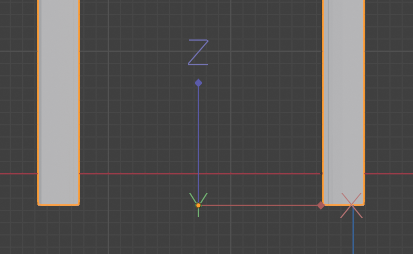
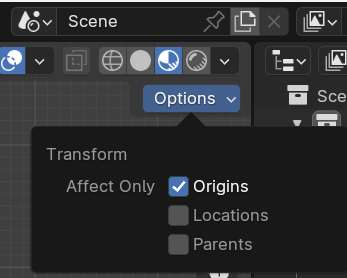
    Or you can set it manually, just go into Edit Mode, then at the top right of the viewfinder go to Options, Transform, Affect Only Origins.

    This allows you to move the origin to wherever you want, without affecting the object. Dont’ forget to apply transforms (ctrl+A) when you’re playing around with this stuff.

  • TIL: multiple selection modes in Blender

    TIL: multiple selection modes in Blender

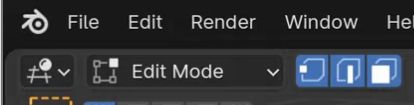
    When in Edit Mode, you can switch the selection mode between Vertex, Edge and Face, using the icons right next to the drop down menu from which you can switch to Object Mode. You can also use the 1, 2, 3 keys as a shortcut.

    What I just learned is that if you Shift+click on the selection modes you can activate more than one at a time, it looks like this:

    You can then click on whatever mesh element to select it.

  • Press Release: Sala Venezia Giulia

    Press Release: Sala Venezia Giulia

    The BCC ICCREA group issued a press release about the newly available Sala Venezia Giulia: an additional room for temporary exhibitions in the Arte in Banca virtual gallery.

    The room currently hosts 5 works by Graziano Cuberli. An inauguration reception was held in Romans d’Isonzo.

    Promotional image for the inaugural reception of the Venezia Giulia virtual room

    For the occasion we overhauled the rest of the Arte in Banca experience. A new control scheme is now available on mobile devices, and the photogrammetries in rooms 1 and 5 can also be accessed in Augmented Reality.

    Dynamic sculpture "Sunset" by Bruno Chersicla is added to a kitchen using Augmented Reality

    New mobile control scheme

    The original control scheme for the Arte in Banca project aimed at providing one-handed six-degrees-of-freedom movement on a touch device. We used a redundant control scheme for rotation, using both the gyroscope and a one finger drag gesture. This allowed for 3dof rotation, but users found the gyroscope cumbersome to use for long periods, as it imposed ergonomic constraints.

    Translation was handled with a one finger press to move forward, and a two fingers tap to move backwards. This movement was combined with the drag rotation to achieve a sort of steering, which was somewhat unwieldy in tight spaces, and didn’t allow for strafing.

    We added two joysticks using nipple.js, the left one controls translation, the right one controls rotation. This works well for people used to videogames, others don’t fare as well.

    This sent us down a rabbit hole of academic papers, user testing, and just plain old trying other products. We found that despite the popularity of 6dof games on mobile devices, most users are just terrible at achieving any sort of mobility. This is very discouraging given our goals, but we also found out that we score great in the mobile version of Call of Duty.

    It seems that there is a reason why our competitors usually restrict movement along one or more axis. This is where we stopped for the Arte in Banca project, but check this blog soon for further experimentation.

    AR view

    We also wanted to add better visualization tools for the objects and sculptures that we digitized. We went the easy way, by using https://modelviewer.dev/

    It provides a nice 3D viewer, and it allows for webAR on both Android and iOS, complete with light estimation, and some rudimentary occlusion. It can be accessed by tapping or clicking on any 3D object in the virtual museum, then on the tiny cubic icon on the right, if you’re using a supported device.

    Stay tuned, we have a lot of interesting projects to write about in the next few months!

  • TIL: “fix” Blender zoom

    TIL: “fix” Blender zoom

    With the default Blender settings it is quite common to get into situation where you just can’t get close enough to your object.

    There are two tricks to fixing it. The first is to use the Shift+C shortcut, to reset.

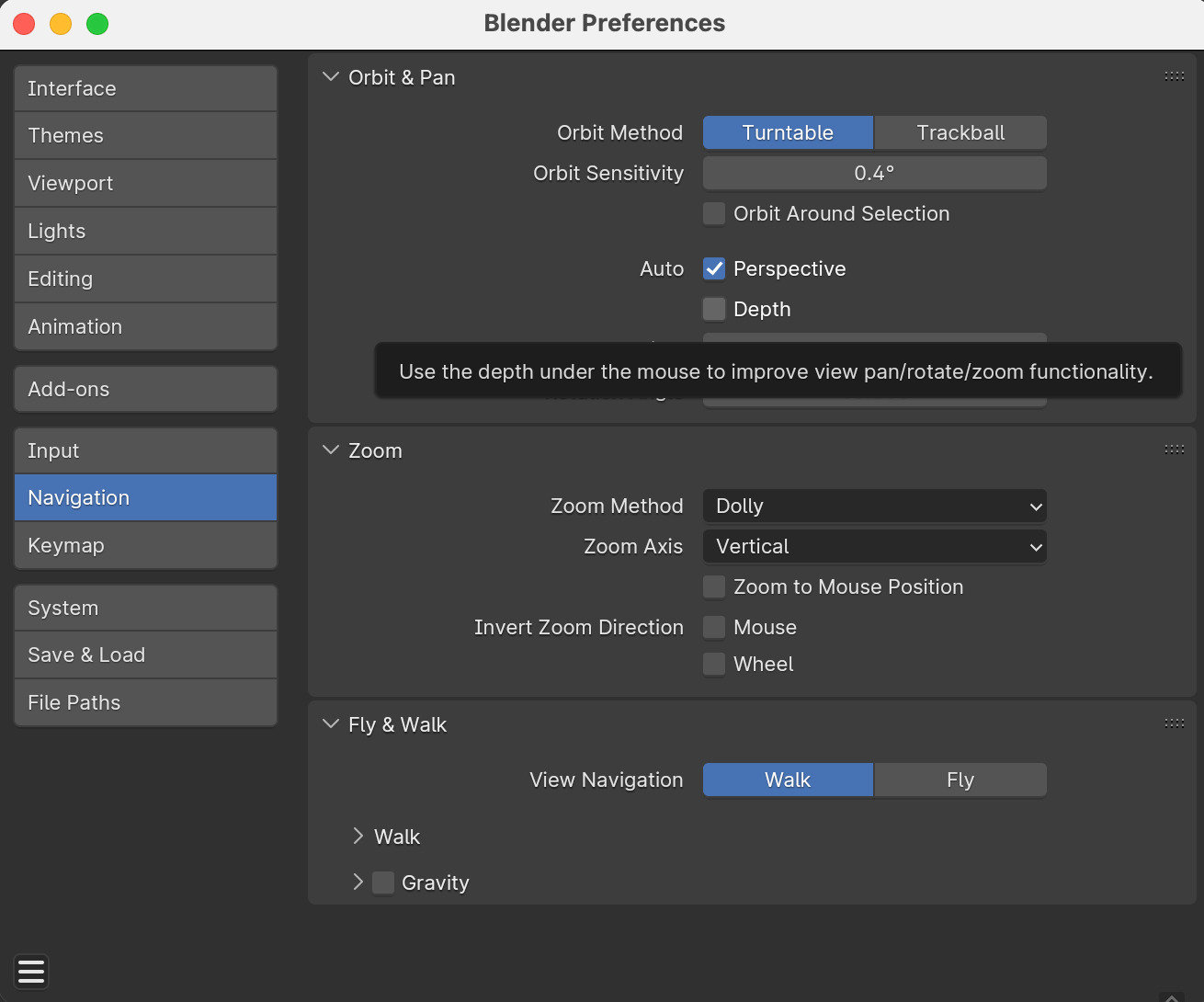
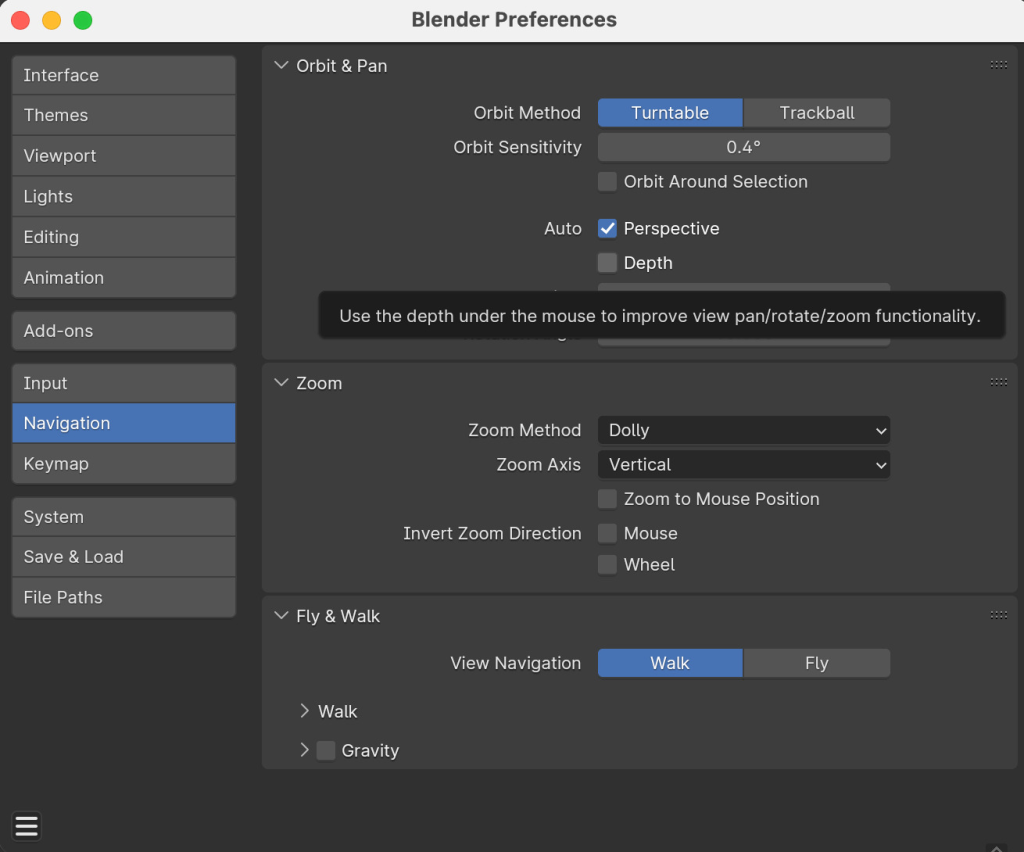
    The second is to enable Auto Depth, under Edit > Preferences > Navigation, as shown in the picture

  • AI Linkpost – 2024-02-06

    Local AI

    Apple open-sourced this interesting local AI for instruction-based image editing.

    https://github.com/Mozilla-Ocho/llamafile

    https://github.com/apple/ml-ferret

    General AI news

    https://www.theverge.com/2024/1/17/24041518/generative-ai-copyright-violation-fair-training-label-certification: Nonprofit group Fairly Trained plans to certify AI models that ask permission to use copyrighted material.

    https://moritzgiessmann.de/blog/posts/using-ai-for-accessibility/

    https://www.theuxda.com/blog/ux-case-study-ai-powered-spatial-banking-for-apple-vision-pro

    https://arstechnica.com/health/2024/01/what-do-threads-mastodon-and-hospital-records-have-in-common/

    Building a fully local LLM voice assistant to control my smart home: Hacker News Thread

    Mixtral 8x7B: A sparse Mixture of Experts language model: Hacker News Thread

    Energy use is one of the real show stoppers with AI, so this is super important: TinyML: Ultra-low power machine learning Hacker News Thread

    Antirez, the maker of Redis, has been experimenting with AI:

    Translating blog posts with GPT-4, or: on hope and fear

    First Token Cutoff LLM sampling

    https://openfuture.eu/blog/ai-and-the-commons-the-paradox-of-open-for-business/

    https://blog.cassidoo.co/post/ai-voice-test/
    https://hidde.blog/redundant-ai/

    https://studiodradiodurans.com/blogs/radar/navigating-the-paradigm-shift

    https://www.theverge.com/2024/1/18/24042354/mark-zuckerberg-meta-agi-reorg-interview

  • Local AI Linkpost

    Links to models that you can run yourself. They call them Open Source, which is not exactly accurate, their licenses are more restrictive, but in practice you can used them, even for commercial applications, and you can poke around them quite a bit.

    1. Code Llama 70B, download, the new version for Meta’s code-generation Large Language Model. Here it is on huggingface.
    2. RWKV Eagle 7B, the most interesting part is that architecturally it is not transformer-based, but it should be more energy-efficient.

    We should probably write a tutorial on how to run these models locally, and on how they can be used productively. The latter is an open question, it is very easy to waste time, and these things tend to be power hungry.

  • Linkpost: webdev edition

    A couple of useful links from and about the web

    1. The best CSS Grid tutorial, from cssprinciples.com. We love interactivity embedded into good old textual pages.
    2. HTML self-awareness from Cassidoo. A neat trick for those among us who don’t use JS frameworks.
    3. Val Town allows you to run functions, schedule them, and build APIs using TypeScript. There is also a community sharing ready-made functions. The e-mail logging function is great for monitoring client-side-only sites.
  • TIL: video editing in Blender

    As a company we are deeply committed to Open Source and Free Software. For video processing we do use a whole lot of ffmpeg, but for video editing we tend to use proprietary solutions like DaVinci Resolve and FinalCut Pro rather than Kdenlive.

    However, we’re already working on Blender most of the time, so why not use that? After all reducing dependencies is generally a benefit to any workflow.

    Here we are going to share just a few tips for users not already familiar with Blender. It is surprisingly internally self-consistent, for something that can do so many different things.

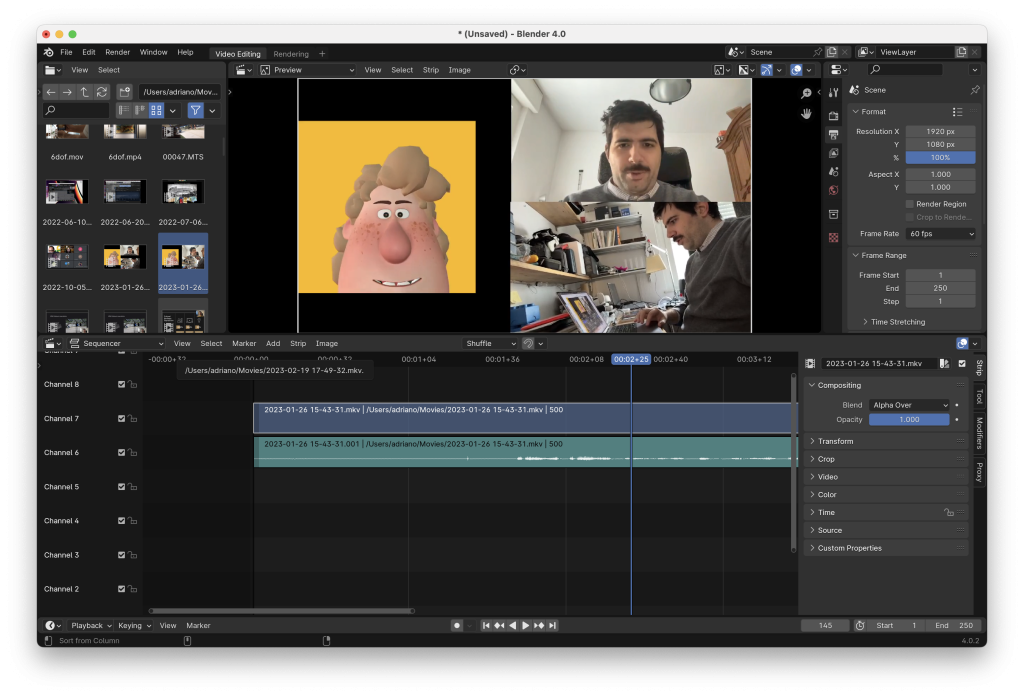
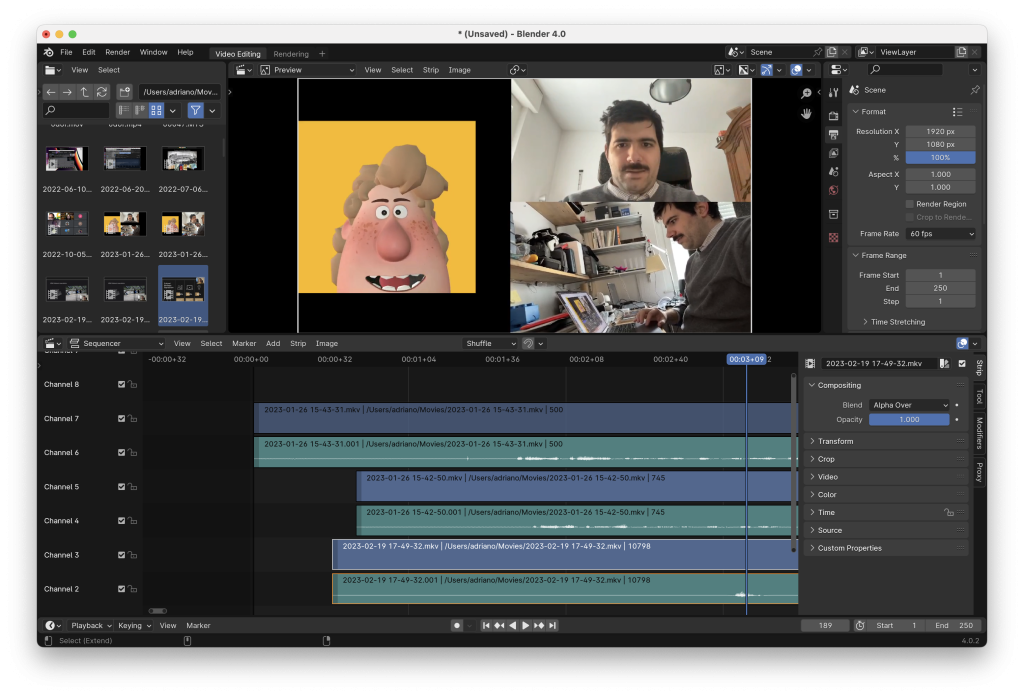
    When opening Blender we can create select the Video Editing layout from the splash screen, we get this layout:

    This is basically the same as any other non-linear video editor: we select files in the top right, we drag into tracks below, we see the result at the top in the center. When we drag videos onto the timeline Proxy Media is automatically generated.

    There are just a couple of tricks to get you started: use Blender keyboard shortcuts, like G to move objects, X to delete them. A video-specific one is Shift+Space+K to select the Blade tool, Shift+Space+W for the select tool.

    The Blade tool is used to split clips under the cursor.

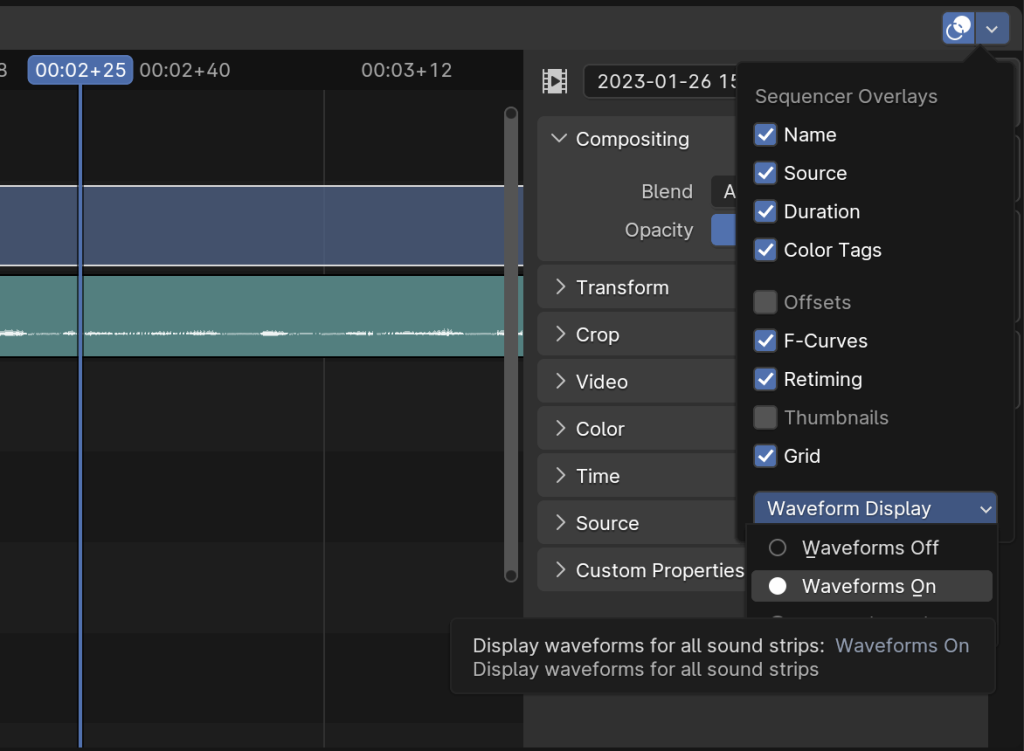
    To make it usable you should also enable Waveform Display for all audio tracks. It’s at the bottom of the video sequencer View menu, which has this icon:

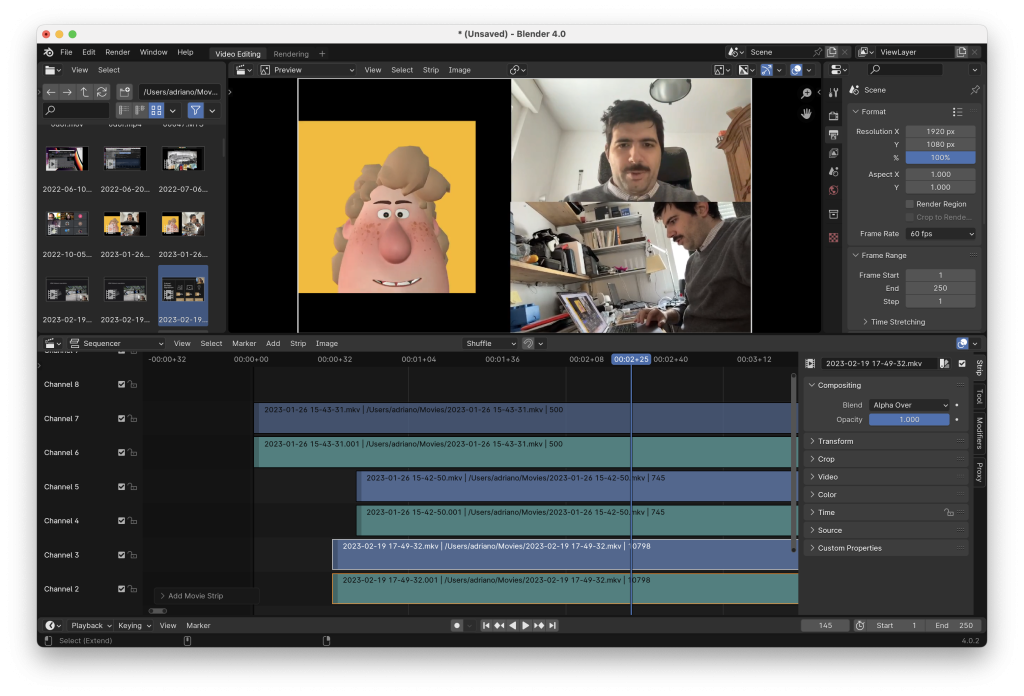
    Here it is with waveform display off:

    And on:

    That makes it much easier to use.

    You can pick you video’s resolution and frame rate in the Scene inspector in the top right, as well as the output file location, container and codec.

    In order to render just press Shift+F12 (Command + F12 on Mac), or go to Render > Render Animation in the top menu.

  • Some AI news, and EU regulation

    Some AI news, and EU regulation

    This ended up being a pretty weird post, juxtaposing technical releases and legal developments, we don’t know if we really managed to give it a coherent shape, but this is very much the complex space in which the future of digital humanities, and indeed the future of everything we do, is being shaped.

    There are a lot of powerful actors that are working to shape it in their favor, and they are not being secretive at all.

    AI stuff

    We’re working on a couple of audio-guide projects, and in one of them it would be really convenient to automate some of the work with an AI. Our current attempts are technically presentable, but honestly pretty boring. Think something like the Spot guide-dog from Boston Dynamics (what is up with their microphones?), but on your phone and without installation. We have built it, it works, we do not think it’s good enough, just like automated translations aren’t really good enough, compared to a good professional translator. Needless to say, we’re keeping our eyes peeled for the latest advancements. After all AI is guaranteed to disrupt us.

    Large Language Models are tools, and it’s up to us how we use them, from Giant Robots Smashing Into Other Giant Robots.

    The EU Council and Parliament have reached an agreement on the new AI ACT. Before the agreement OpenFuture had written about copyright opt-outs, about friction and governance and about self-regulation.

    Local AI

    Sticking to AI, it seems that Google is catching up to ChatGPT, confirming our “there is no moat” position. However, just like Threads and Horizon Worlds, it is not coming to the EU yet, which we consider a worrying trend.

    We suspect it’s going to end up just like cloud computing: there is a lot of money to be made, but it’s going to be so capital-intensive that only a few big players will dominate the market, developing useful products that are hamstrung by the imperative to build in vendor lock-in. Luckily there are some really interesting developments on the local deployment side, and we think that the transparency and user control of locally run Open Source software are going to be extremely important.

    Mozilla published a guide for new AI developers last month, but last week they also published Llamafile, which combines llama.cpp and the brilliant Cosmopolitan library to distribute Large Language Models as single files.

    In a similar vein Noiselith allows us to run Stable Diffusion XL and generate images on local hardware, with a user-friendly setup.

    Voicemod allows to change your voice in real time, both to existing voices and to newly generated ones. We do not agree with The Verge’s disregard for the legal aspects of voice cloning, rights limiting the reproduction of one’s likeness are well established, copyright is not the issue.

    Apple released a Machine Learning framework for Apple Silicon, and they literally just pushed it on GitHub without announcing it. Of course nothing that Apple does passes unnoticed, the tech press was instantly on it.

    The ex-Apple employees behind Shortcuts have a new desktop AI startup.

    Meta, IBM, Intel, and around 50 other organizations launched an alliance for Open Source AI.

    Mistral AI, the French company that releases Apache-licensed models (their benchmark scores are pretty amazing), has received a $2B evaluation.

    AI Trust

    Meta has a new AI trust and safety initiative, but at a glance it seems like it’s mostly focused on spotting content that does not align with what the owners want, which is obviously super important.

    The most important article on AI trust you’ll read this week: AI and Trust by Bruce Schneider.

    Stuff at the intersection between law and culture

    Getting back to EU legislation, Felix Reda (of Pirate Party fame) and Justus Dreyling wrote about the need for a Digital Knowledge Act, highlighting the need to achieve something that is very much in line with our mission: allowing every research question to be done online. It should never happen that a document or a resource is held in a public archive or is made with public money (we’re thinking of scientific papers) and not be made available, online and for free.

    Cory Doctorow wrote on the evils of DRM, and that is always important to keep in mind when building digital archives and collections.

    The EU Data ACT is also moving forwards, with some good stuff (harmonization and foreign transfers, in particular) and some really concerning bits. Offering legal protection to trade secrets favors some specific players, but it is opposed to the hard bargain that makes patents exist. The current discourse seems to have lost sight of the fact that “Intellectual Property” is not property at all, in the abstract all knowledge should belong to every human being, we have setup a legal system that exchanges a temporal monopoly for technical information (in the case of patents) or as an incentive for the creation of more cultural works (in the case of copyright). Trade secrets should not be legally protected, if you want protection you should use patents. The current Data Act agreement also restricts reverse engineering, which is terribly harmful for innovation and competition.

    Work has also been progressing on the EU Cyber Resilience Act. It seemed to go in a weird direction for what concerns the intersection between security and Open Source, but they seem to have already fixed the most glaring issues. This is a good chance to recommend following Bert Hubert, he always has insightful articles and up to date news. For example that’s how we learned about this case in which Sony attempted to strong arm a DNS provider.