Category: webdev

  • Linkpost: brilliant 3D webgame

    This has been making the rounds of all the popular link aggregators, and it is truly brilliant: https://messenger.abeto.co/

    This is truly a reference of everything we’re striving for, it’s just that we also want to support VR headsets.

    One of the creators has a talk explaining how they work:

  • WebXR is now supported on all major browsers

    https://x.com/AdaRoseCannon/status/1835739519766945793

    With the visionOS2 release Safari gains webXR support

  • Tip: use Tree to generate HTML directory listings

    Part of our job in the BCC Arte & Cultura project is to provide the “high fidelity” visualizations for each artwork. For some that means one of our 3D scans, for others it’s simply a zoomable interface. Our clients are making a “standard” website and simply linking to our server for the high fidelity version. We are not done processing all the artworks, but we can provide the URL in advance, they are all ordered by a bank/author-title schema. I wrote a script for creating the folder structure, but then I wanted to provide a single page listing all the URLs to our clients.

    With a bit of research I found out a oneliner using the tree command.

    You can try the result on https://e-muse.it/bccaec

    “opere” is just the relative path between the location where I’m running the command and the directory structure I wanted to transverse.

    tree opere -d -H "https://e-muse.it/bccaec" > index.html
  • Self description considered harmful

    In the post on alt-text from the other day we briefly talked about our perplexity about self descriptions: the trendy practice of describing one’s appearance when speaking at online conferences.

    The new WebAIM screen reader user survey came out, and it turns out that 68% or respondents agree with us.

  • TIL: minimal PWA setup

    TIL: minimal PWA setup

    Our webdev approach tends towards the minimal, we’re allergic to leaky abstractions. Even using WordPress for this blog is mostly motivated by learning more about such a popular system, for everything else we use good old HTML + CSS + JS, served by a good old Apache web server.

    PWAs (Progressive Web Apps) are websites which can be installed on a user’s device, and that can even be listed in app stores. Our research indicates that a certain percentage of users search their app stores before searching on the web. This is honestly hard to comprehend, but that does not mean that we don’t want to serve those users. Most people building PWAs use JavaScript frameworks, like React, Vue, Angular, Flutter, and just so many others.

    We’re deeply suspicious of those framework. It is certainly possible to use them well, but the examples of their misuse, and of people learning them before learning actual web development, and consequently perpetuating terrible, unaccessible, practices, are just too widespread to ignore.

    Luckily, we don’t have to get our hands dirty to get the benefits of PWAs, we just need to add a manifest and a service worker. We don’t even need to actually write them ourselves! We can just install PWABuilder Studio for Visual Studio code, open the folder for our web app, and run a couple of commands.

    Specifically, press Ctrl+Shift+P to open the command Palette, write PWA to find the relevant commands, and then run PWA Builder Studio: Generate Web Manifest. This will generate a manifest.json file, in which you’ll have to specify your app name, canonical URL, icon, and so on.

    Then run PWA Builder Studio: Generate Service Worker to enable offline functionality.

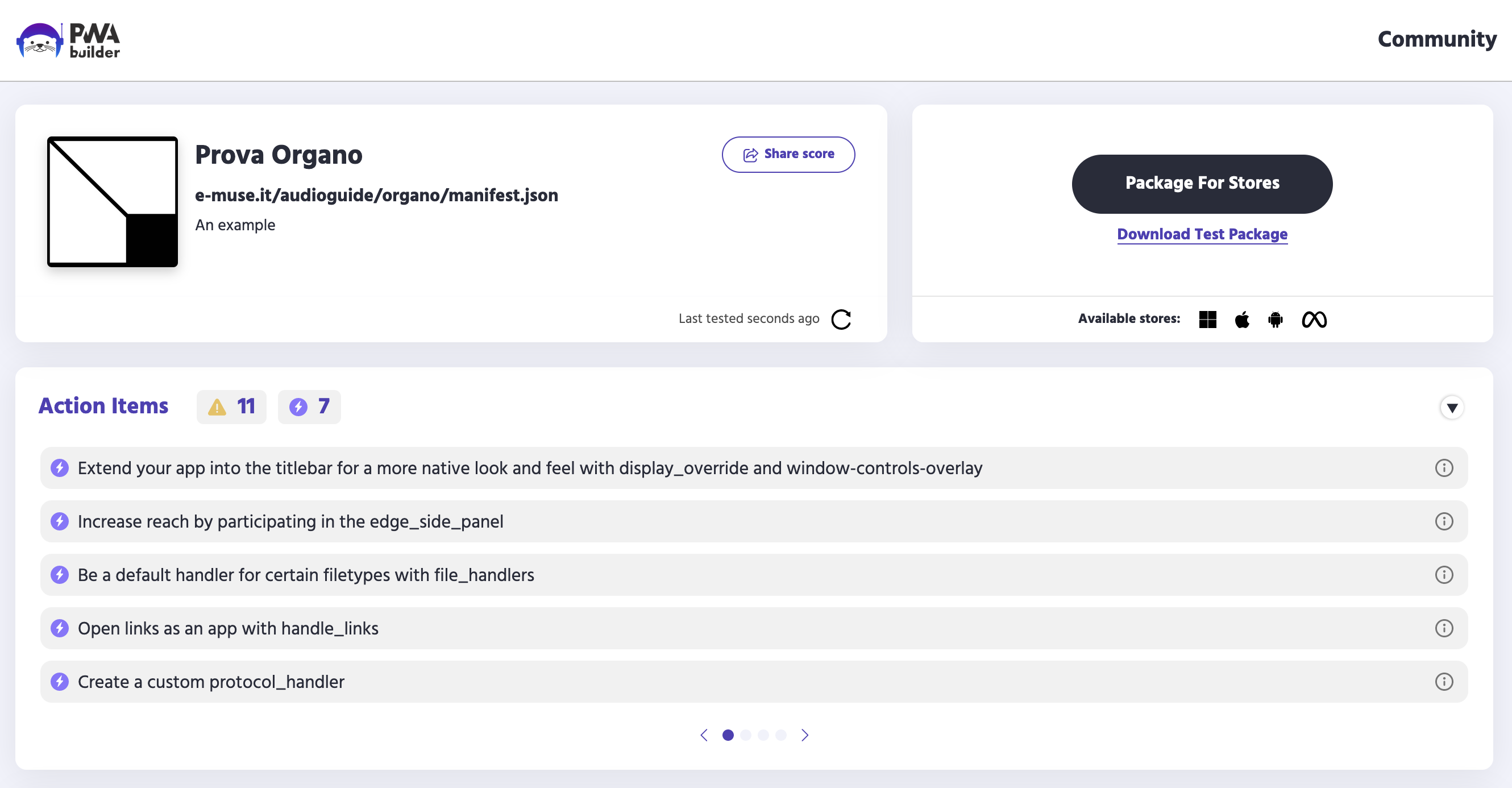
    You can test your results as soon as you’ve uploaded your files to a web server of your choice, we tried with the demo of an audio-guide product that we’re building. If you insert the URL of your web app into the PWABuilder homepage you can obtain a report card, and you can download packages that can be submitted to the main app stores (Windows, Android, iOS, Meta Quest).

    And that’s it, the only question is how to communicate the new functionality to your users. Let us know if you have suggestions on that front 😀

  • A few posts on alt-text

    We really care about accessibility, and alt-text is one of the most visible interventions in this field, thanks to its inclusion in social media UIs and to activist evangelism.

    As a primer, Eric Bailey wrote some thoughts about the nuances of the matter: https://ericwbailey.website/published/thoughts-on-embedding-alternative-text-metadata-into-images/

    Also check out this post by Heather Buchel, with a much broader focus: https://heather-buchel.com/blog/2024/03/letters-to-an-accessibility-advocate/

    What follows are instead our own thoughts.

    Decorative Images

    The general idea is that alt-text is going to be used by anyone who cannot look at a picture, and that it should be as good a substitute as possible. We should think about the meaning of a picture, and about its function in the webpage, and about how the alt-text will be used in practice. A whole lot of images are simply decoration, and the general advice is to exclude them, so that text to speech systems don’t waste time reading descriptions that don’t actually carry any meaning.

    However, even extraneous decoration carries connotations that influence the interpretation of the written word. Should we attempt to transmit the same connotations to every user? And should we attempt to provide cultural context for those who lack it? This is the kind of thinking that leads to people giving short self-descriptions at the beginning of online conferences, something that seems to be quite common in the US. I have nothing against it, but I also don’t really understand the value of it. I’ll happily do it when it’s asked, but I don’t do it of my own initiative.

    Rich Images

    What about images that carry a lot of information? Charts, and graphs, or increasingly maps. How do we enable everyone to access the information in our own 3D spaces?

    The short answer is that we try to follow the W3C guidelines:

    1. https://www.w3.org/WAI/tutorials/images/complex/
    2. https://www.w3.org/WAI/tutorials/images/informative/

    The longer answer is that it is a bit of an art form, and that sometimes the only solution is to be redundant, and just recreate everything in good old text. This can be hard work, but nobody claimed that having principles is easy.

    Specifically for visual art, it is sometimes very hard to motivate clients, we’ve often heard the argument that visually impaired users are intrinsically excluded, or intrinsically uninterested. We’re glad to report that our clients from the banking sector have been universally fully committed to accessibility, they’re institutionally used to it being a legal requirement. (They do tend to use overlays a bit too much, for my tastes)

    AI

    There has been much ado about the usage of AI for generating alt-text. This is something that already happens a whole lot on social networks. Famous web-usability expert Jakob Nielsen wrote about it recently (I mean, it’s a bit of a wider argument, but very related), and it caused a bit of a shitstorm in the community. I’m just going to link to Adrian Roselli’s take: https://adrianroselli.com/2024/03/jakob-has-jumped-the-shark.html

    My own take is that the work needed to make a site accessible is all going towards making the website better.

  • Press Release: Sala Venezia Giulia

    Press Release: Sala Venezia Giulia

    The BCC ICCREA group issued a press release about the newly available Sala Venezia Giulia: an additional room for temporary exhibitions in the Arte in Banca virtual gallery.

    The room currently hosts 5 works by Graziano Cuberli. An inauguration reception was held in Romans d’Isonzo.

    Promotional image for the inaugural reception of the Venezia Giulia virtual room

    For the occasion we overhauled the rest of the Arte in Banca experience. A new control scheme is now available on mobile devices, and the photogrammetries in rooms 1 and 5 can also be accessed in Augmented Reality.

    Dynamic sculpture "Sunset" by Bruno Chersicla is added to a kitchen using Augmented Reality

    New mobile control scheme

    The original control scheme for the Arte in Banca project aimed at providing one-handed six-degrees-of-freedom movement on a touch device. We used a redundant control scheme for rotation, using both the gyroscope and a one finger drag gesture. This allowed for 3dof rotation, but users found the gyroscope cumbersome to use for long periods, as it imposed ergonomic constraints.

    Translation was handled with a one finger press to move forward, and a two fingers tap to move backwards. This movement was combined with the drag rotation to achieve a sort of steering, which was somewhat unwieldy in tight spaces, and didn’t allow for strafing.

    We added two joysticks using nipple.js, the left one controls translation, the right one controls rotation. This works well for people used to videogames, others don’t fare as well.

    This sent us down a rabbit hole of academic papers, user testing, and just plain old trying other products. We found that despite the popularity of 6dof games on mobile devices, most users are just terrible at achieving any sort of mobility. This is very discouraging given our goals, but we also found out that we score great in the mobile version of Call of Duty.

    It seems that there is a reason why our competitors usually restrict movement along one or more axis. This is where we stopped for the Arte in Banca project, but check this blog soon for further experimentation.

    AR view

    We also wanted to add better visualization tools for the objects and sculptures that we digitized. We went the easy way, by using https://modelviewer.dev/

    It provides a nice 3D viewer, and it allows for webAR on both Android and iOS, complete with light estimation, and some rudimentary occlusion. It can be accessed by tapping or clicking on any 3D object in the virtual museum, then on the tiny cubic icon on the right, if you’re using a supported device.

    Stay tuned, we have a lot of interesting projects to write about in the next few months!

  • TIL: a dive into web components

    Here at E-MUSE we favour sticking to HTML until we absolutely need CSS, and sticking sto CSS until we absolutely need JS, and sticking to client-side framework-less JS until we absolutely need to. Related to this, here is a tiny TIL: Offloading Javascript with Custom Properties, on the interaction between JavaScript and custom CSS properties.

    Web components allow for the richness of JS frameworks, while maintaining the clean semantics of HTML.

    Let’s start from the MDN explainer: https://developer.mozilla.org/en-US/docs/Web/API/Web_components/Using_custom_elements

    And here are a few recent blog posts and resources on web components:

  • Linkpost: webdev edition

    A couple of useful links from and about the web

    1. The best CSS Grid tutorial, from cssprinciples.com. We love interactivity embedded into good old textual pages.
    2. HTML self-awareness from Cassidoo. A neat trick for those among us who don’t use JS frameworks.
    3. Val Town allows you to run functions, schedule them, and build APIs using TypeScript. There is also a community sharing ready-made functions. The e-mail logging function is great for monitoring client-side-only sites.
  • TIL: CSS Scroll Snapping, nested selectors

    Our designer is building her personal portfolio website, and she’s way less conservative than me with her layouts. In order to actually implement her design I found out about CSS scroll-snapping, and the nested selector.

    The latter has reached Baseline status in December 2023, so it makes sense that I didn’t know about it yet!